The PUDU CC1 Series SC5.23.16 software release introduces practical upgrades focused on deployment speed, cleaning consistency, and operational control.
If you operate CC1 or CC1 Pro in real facilities, this release is less about cosmetic changes and more about workflow improvements:
- faster demonstrations and temporary cleaning starts
- reduced manual map/path teaching for edge scenarios
- quicker post-map risk validation
- better congestion handling in mixed-robot/mixed-vehicle corridors
- stronger task-level reporting and maintenance enforcement options
What’s new in SC5.23.16 (at a glance)
Release highlights:
- Quick Show (Quick Demonstration Mode)
- Automatic Edge Cleaning V1.0 + Edge Cleaning Speed Optimization
- Quick On-site Test
- Alternating Passage Zone V2.0
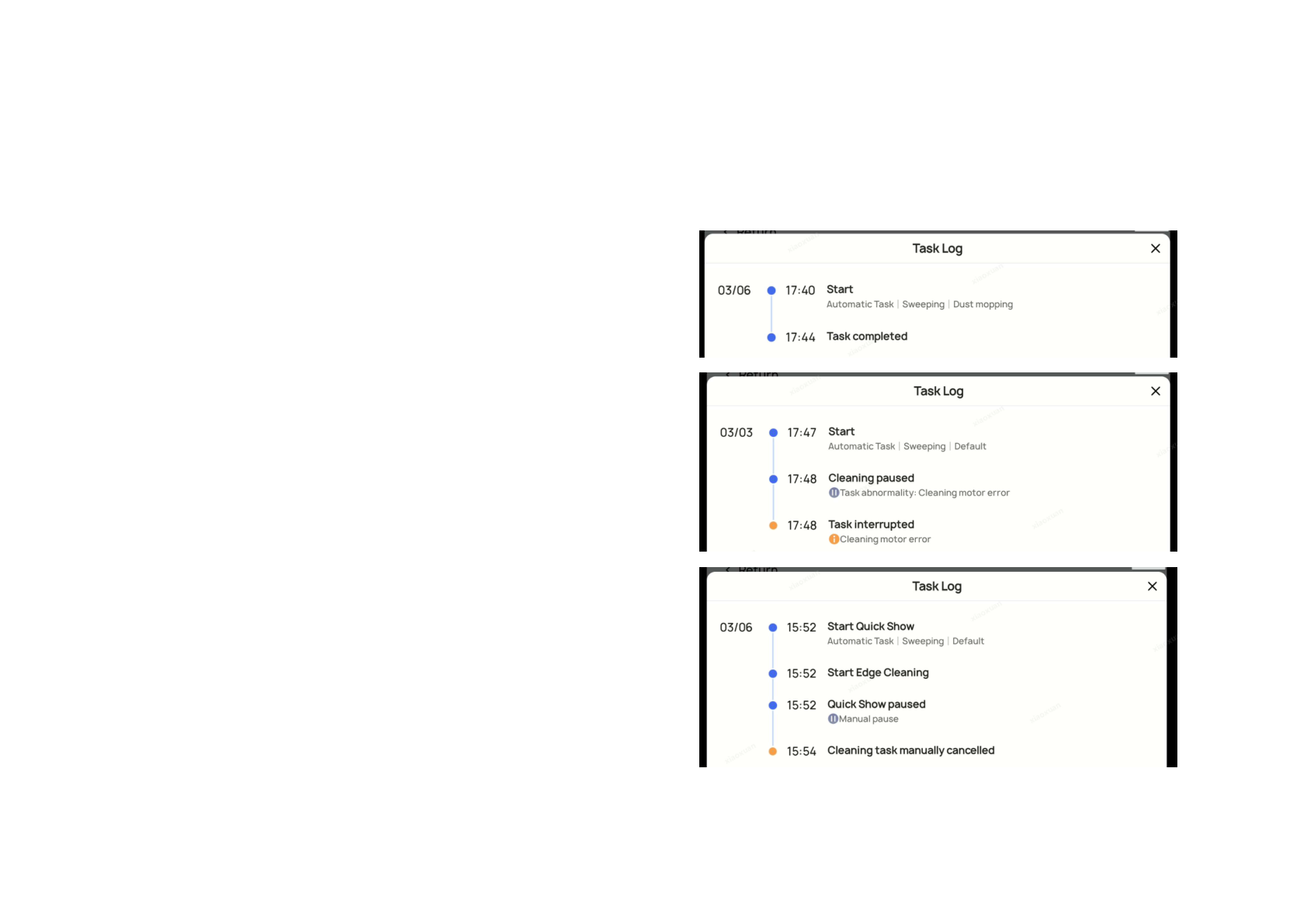
- Cleaning Report task-node time recording
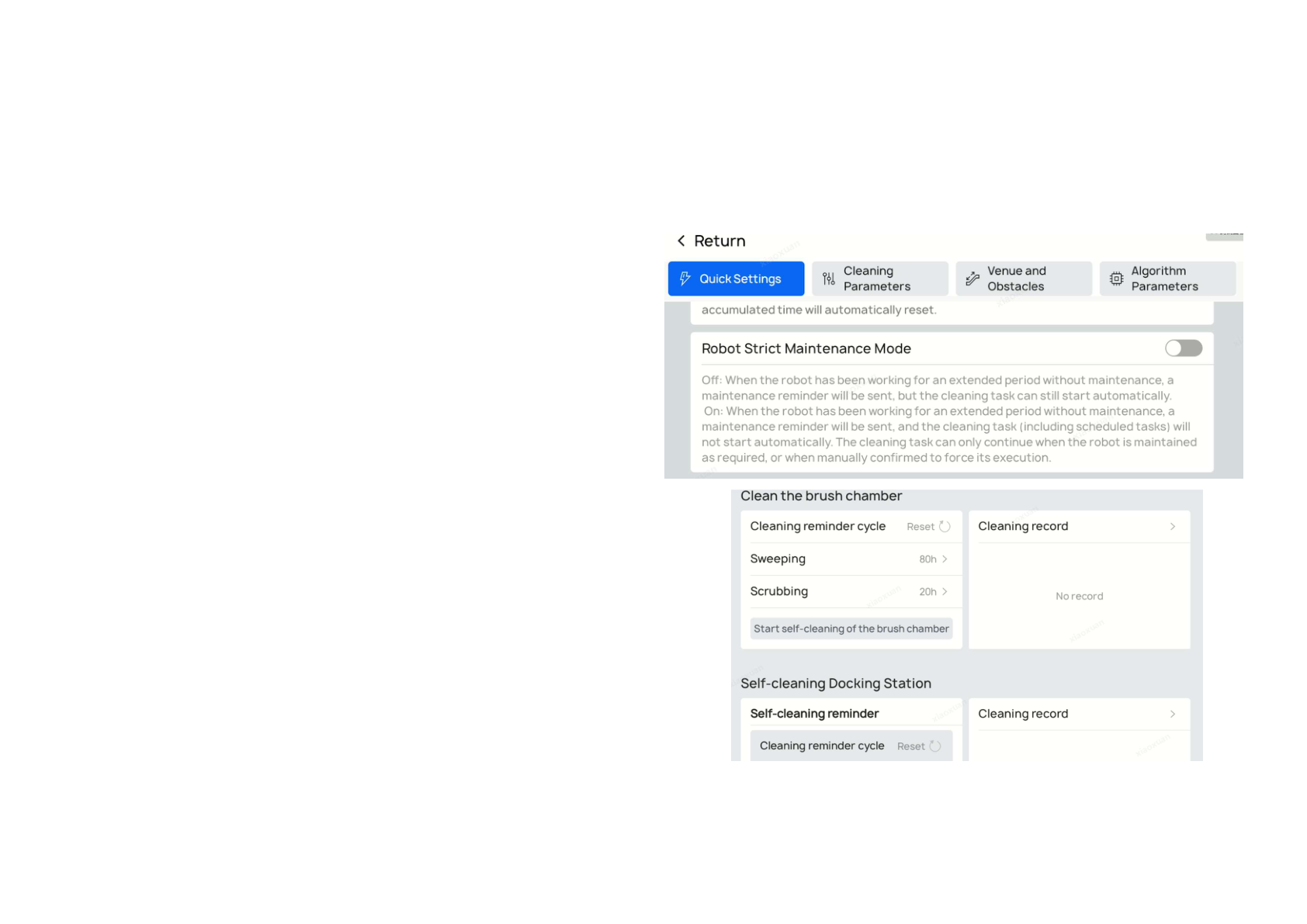
- Robot Strict Maintenance Mode
- Added language support (Latvian, Estonian, Greek)
1) Quick Show (Quick Demonstration Mode)
Function description
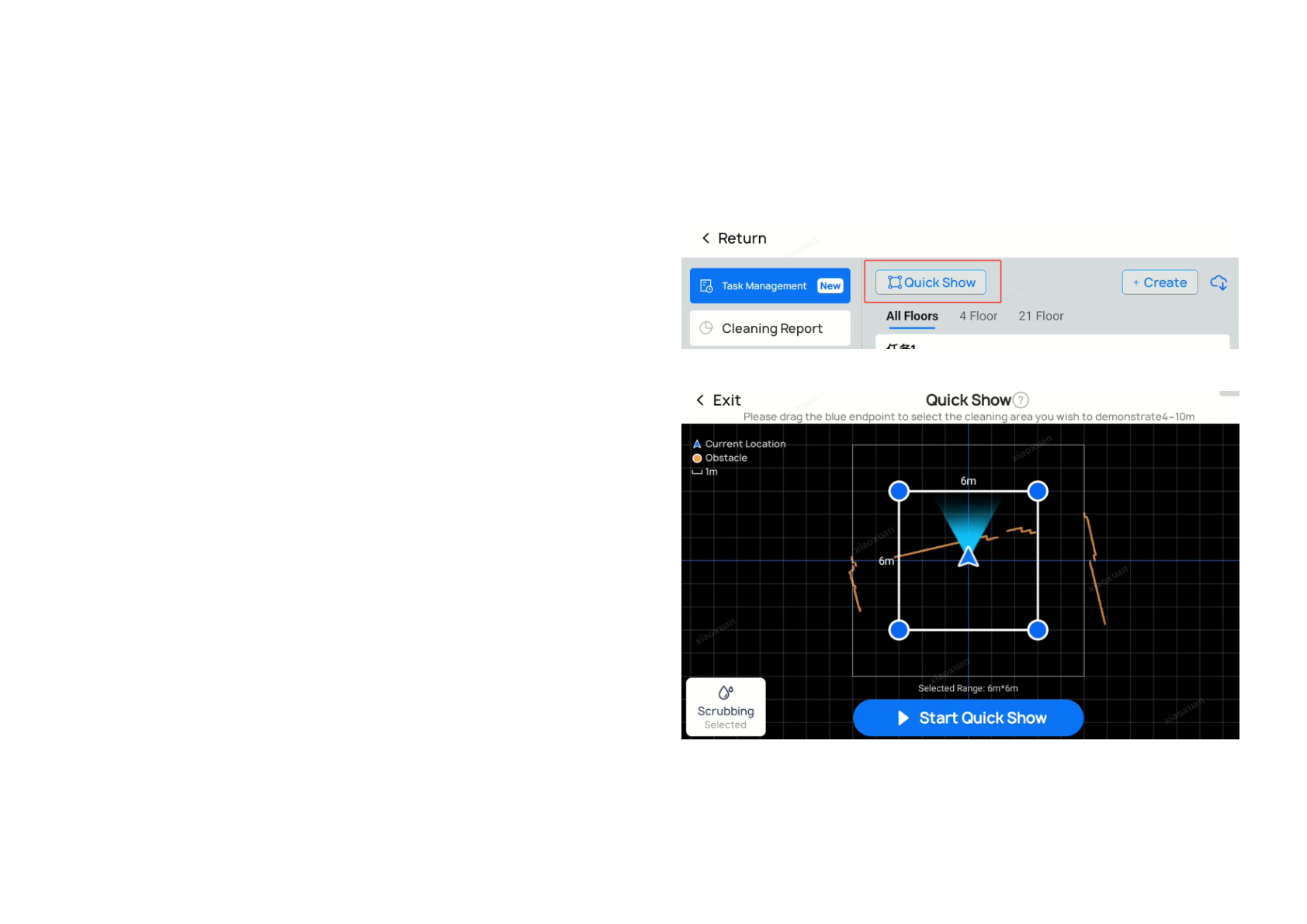
No mapping is required. Operators can define a temporary cleaning range and start cleaning immediately to demonstrate robot capability.
User value
Traditionally, first-time demos require map creation, map editing, saving, and task setup before the robot can clean. That process is slow in customer-facing situations.
With Quick Show:
- you select a cleaning area and cleaning mode
- the robot starts immediately
- temporary planning and obstacle avoidance happen automatically
- no permanent map/task buildout is required for demo-only runs
This also helps with temporary cleaning requests where a full map/task workflow would be overkill.
Applicable scenarios
- First-time customer demonstrations
- Temporary ad hoc cleaning requests
Notes
- Selectable range is rectangular, with sides around 4 to 10 meters
- Quick Show supports loop-shaped cleaning paths only
- For best results, choose open areas and keep selected edges parallel to nearby walls

2) Automatic Edge Cleaning V1.0 + Edge Cleaning Speed Optimization
Function description
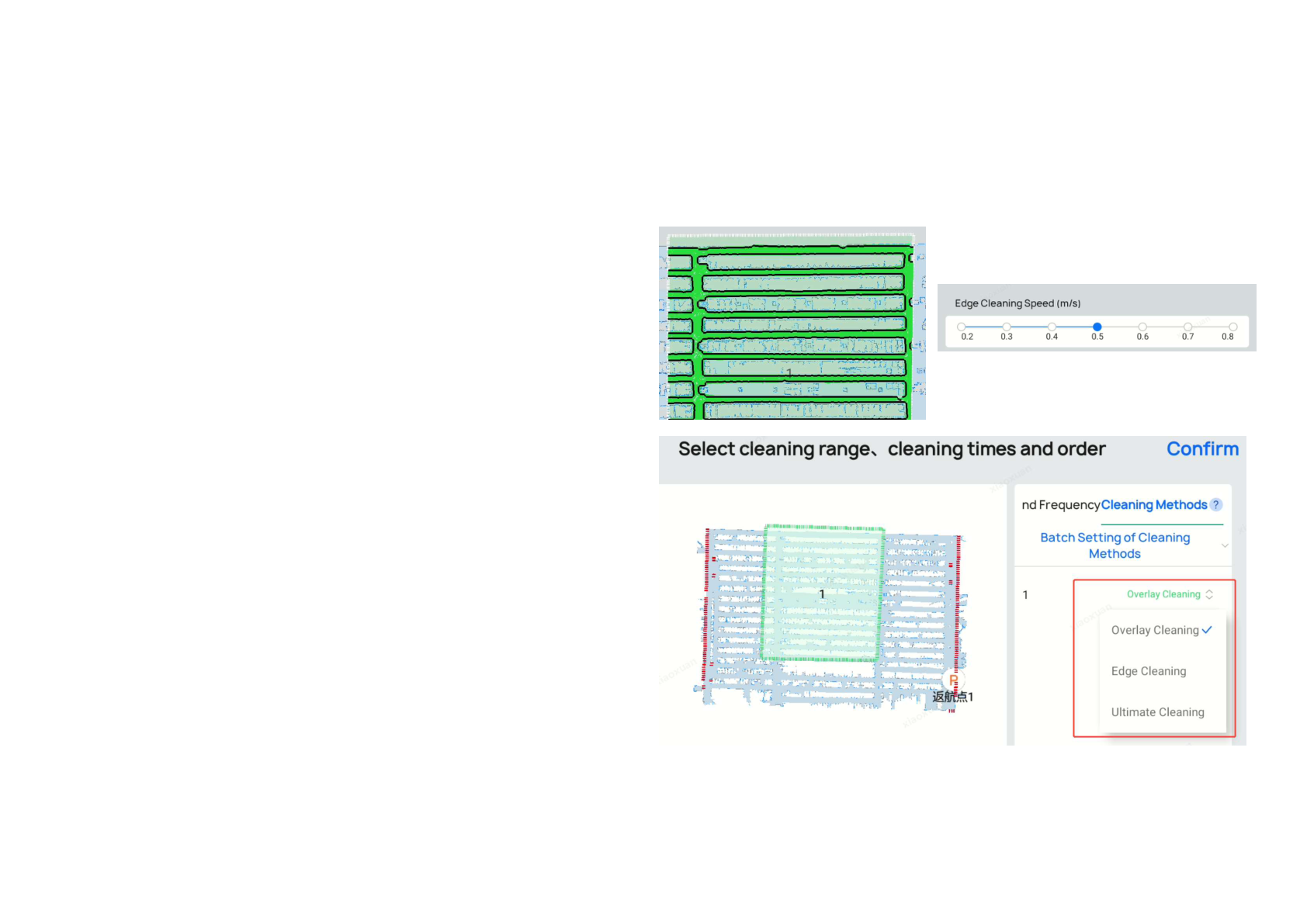
The robot can auto-generate edge-following paths from map and obstacle boundaries inside cleaning zones, eliminating mandatory manual teach-path setup for many edge-cleaning workflows.
Cleaning mode options per area:
- Coverage Cleaning (normal area coverage)
- Edge-Following Cleaning (edge path only)
- Ultimate Cleaning (edge-following + coverage sequence)
Edge-following speed can now be tuned independently: 0.2–0.8 m/s.
User value
This is especially useful in scenarios requiring zero-edge residual cleaning (walls, shelf lines, perimeter transitions) while reducing manual path authoring overhead.
Applicable scenarios
- Wall-edge cleaning
- Supermarket shelf-edge cleaning
- Any perimeter-sensitive cleaning zone
Notes
- Automatic edge paths are generated when a cleaning area is added (shown as black lines)
- For existing maps, open map editing, click the area, and save again to generate paths
- Incorrect auto paths caused by temporary obstacles can be manually deleted
- In task editing, "Extreme Cleaning" or "Edge Cleaning Only" uses auto edge-following paths
- Manual teach paths are still supported
- Edge speed can be adjusted separately in both settings and tasks
3) Quick On-site Test
Function description
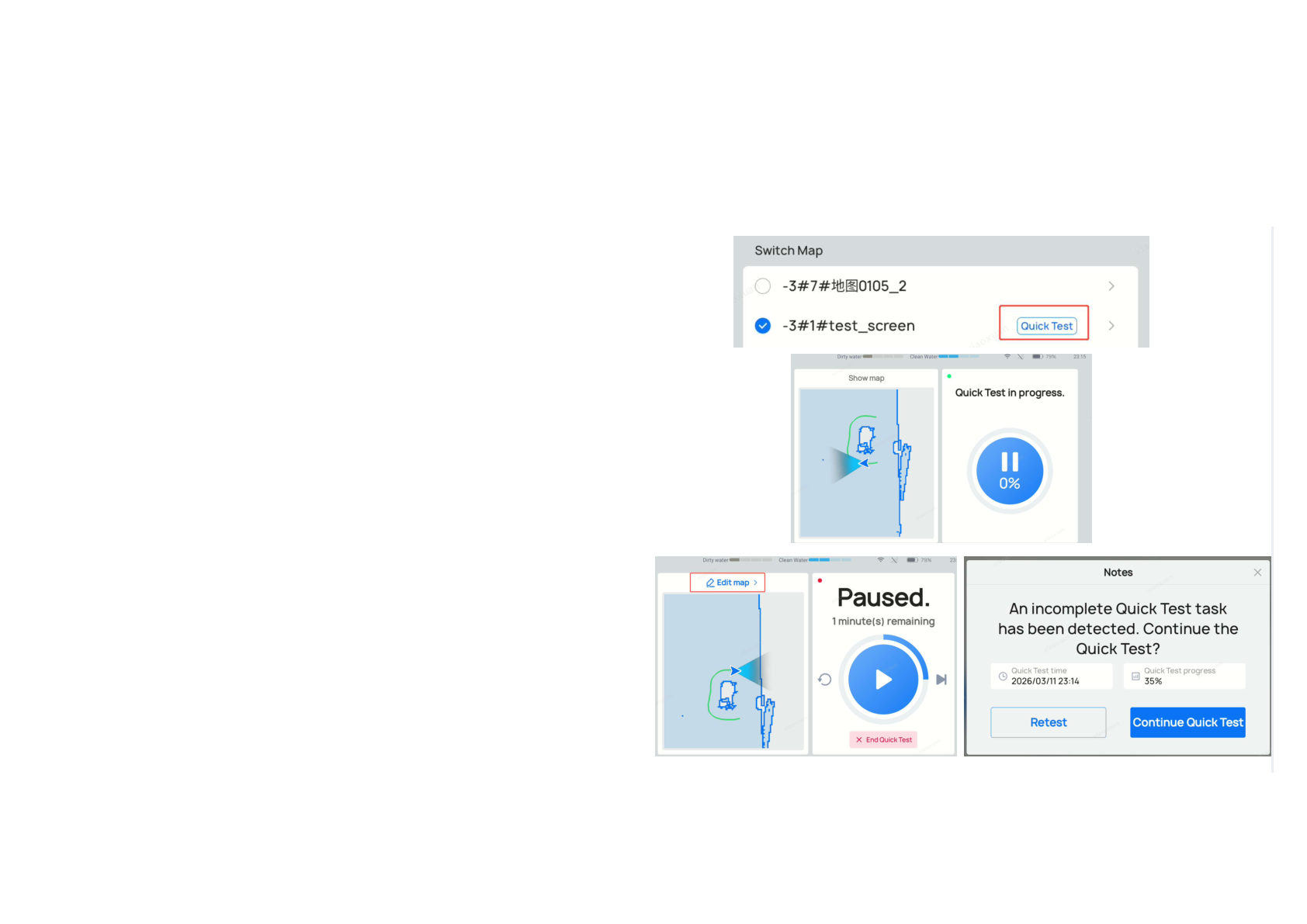
After mapping, operators can run a rapid test that follows map/obstacle edge paths to validate congestion and risk points faster than full coverage test runs.
If the robot encounters blockage/collision risk during the test, movement pauses and prompts for map adjustments.
During the test, operators can:
- pause and edit map
- add virtual walls / restricted areas / fall-risk zones
- resume testing from the updated plan
The workflow also supports exit + resume with unfinished-test reminders.
User value
Compared to full-area verification runs, this significantly reduces acceptance-test time while enabling real-time correction.
Applicable scenarios
- Medium-to-large deployments after initial map setup
Notes
- An operator should follow the robot during testing for real-time map correction
- Quick On-site Test relies on auto edge-cleaning paths (regenerate by re-saving edited areas if needed)
- Pause view supports "Skip Current Path" and "Restart Current Path"
4) Alternating Passage Zone V2.0 (congestion handling)
Function description
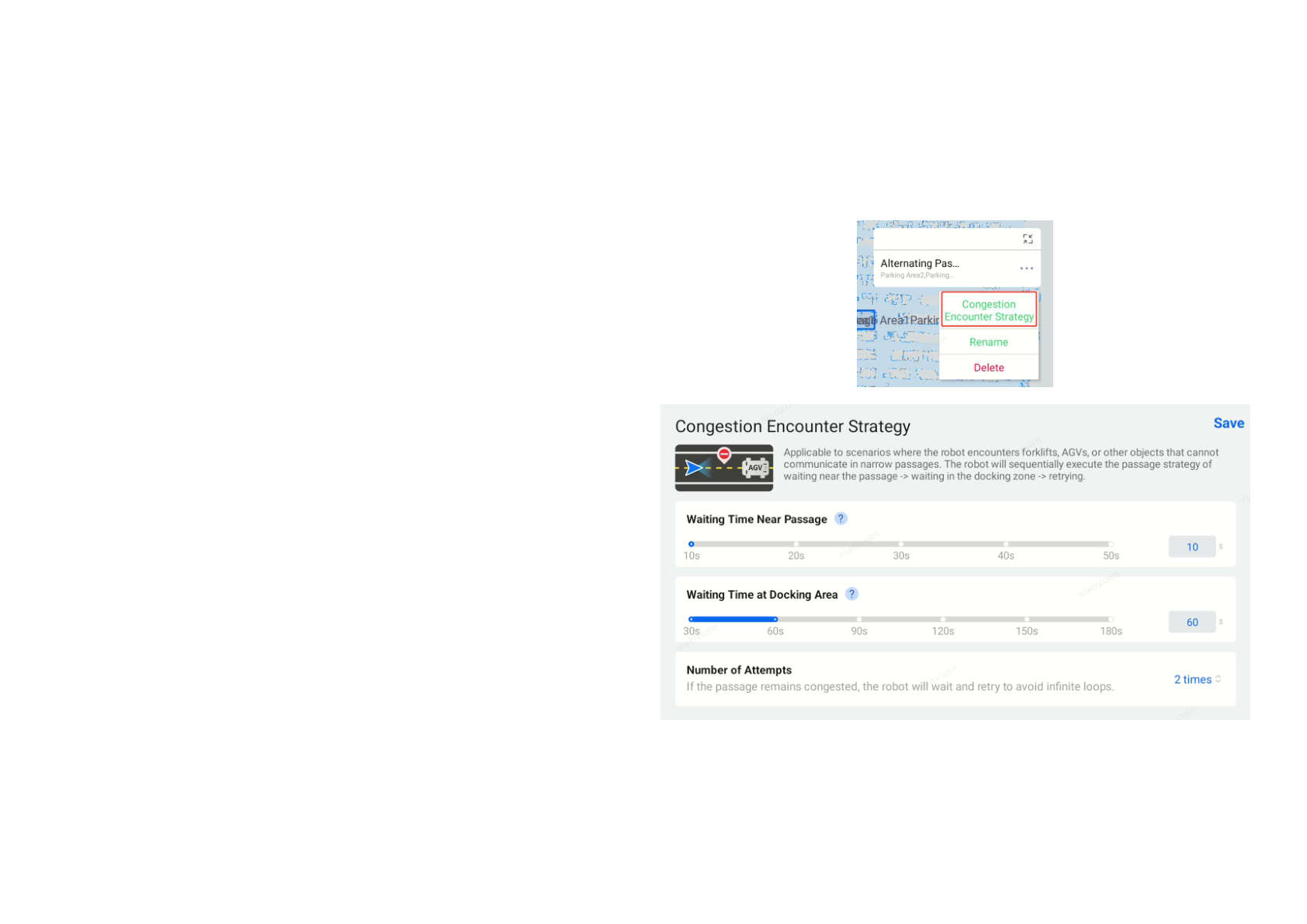
A new congestion-clearance strategy option can be configured for alternating passage zones.
If unexplained congestion exceeds a configured threshold, the robot can move to a designated parking/wait area to yield.
User value
This improves flow in corridors shared with moving entities that do not participate in PUDU scheduling, such as:
- AGVs
- forklifts
- third-party robots
- trolleys and other mobile equipment
Applicable scenarios
- Factories
- supermarkets
- hotels
- multi-vendor robotics environments with narrow passageways
Notes
- Alternating Passage Zone 2.0 still supports short-range PUDU robot communication
- Congestion strategy tuning should reflect passage length and non-PUDU traffic speed; coordinating AGV/robot policies improves results
5) Cleaning Report: Task Information Recording
Function description
A new task recording function adds detailed timeline and key-node event records to cleaning reports, including:
- task start
- pause + pause reason
- task resumption
- interruption + reason
- task cancellation + reason
- task completion
- return actions + reason
- return-to-charge / return-to-water
- skipped area + reason
User value
Teams can understand behavior and time usage without relying on deep log analysis when tasks run long or show unusual area outcomes.
Applicable scenarios
- Large areas with many temporary obstacles
- Operations where route efficiency and behavior traceability are critical
Notes
- Recorded timestamps are based on robot local time
6) Strict Maintenance Mode (optional)
Function description
Strict Maintenance Mode is now available in Advanced / Quick Settings (default off).
When off:
- robot shows maintenance reminders
- automatic/scheduled tasks can still start
When on:
- robot shows maintenance reminders
- automatic/scheduled tasks are blocked until maintenance requirements are satisfied or manually force-confirmed
User value
Helps prevent cleaning tasks from running with overdue maintenance states, reducing secondary contamination risk in demanding environments.
Applicable scenarios
- Medium/heavy pollution scenarios requiring stricter maintenance discipline
Notes
- Disabled by default; existing deployments are not disrupted automatically after upgrade
- Enable only where maintenance discipline requirements justify schedule-block behavior
- Applies to cumulative cleaning component reminders, roller brush box self-cleaning, and self-cleaning reminders
- With filter/dust-box in-place detection enabled (CC1 2025 / CC1 Pro), manual "Maintained Robot" confirmation checks remove/reinstall behavior; incorrect maintenance state continues to block auto starts
7) Experience Optimization: Added language support
Added languages:
- Latvian
- Estonian
- Greek
Recommended rollout checklist
After updating to SC5.23.16, teams should:
- Test Quick Show in a representative open area
- Re-save existing cleaning areas to regenerate automatic edge paths where needed
- Run Quick On-site Test before full shift scheduling
- Validate alternating passage behavior in known bottlenecks
- Review report exports with the new timeline node data
- Decide whether to enable Strict Maintenance Mode by site profile
Final take
SC5.23.16 is a strongly operations-oriented release: faster demo/start workflows, cleaner edge behavior, quicker post-map validation, stronger multi-device corridor strategy, and more auditable reports.
For teams scaling CC1/CC1 Pro across multiple facilities, these updates can reduce rollout friction and improve day-to-day consistency without requiring a platform change.